iNet2DVR
Information
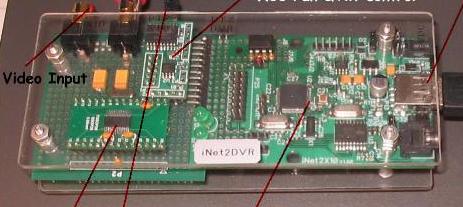
(iNet2DVR controller prototype)
iNet2DVR Development History
iNet2DVR was initially developed for my personal use. I looked closely at a
number of other home automation systems that used a variety automation
protocols, zigbee, inseton, UPB, Z-wave, X10 etc. My criteria was keeping it low
cost, easy to setup, easy to use, have real time video and run on a Smartphone.
I did not want to have to pay a monthly fee to an alarm company, cable company
or cloud service provider to do home automation.
I've used the X10 ActiveHome Pro, and MyHouse programs a number of years ago. I
did not like having to have a PC on all the time. The early video camera access
service thru X10 they had was difficult to use and most of the time their server
was down.
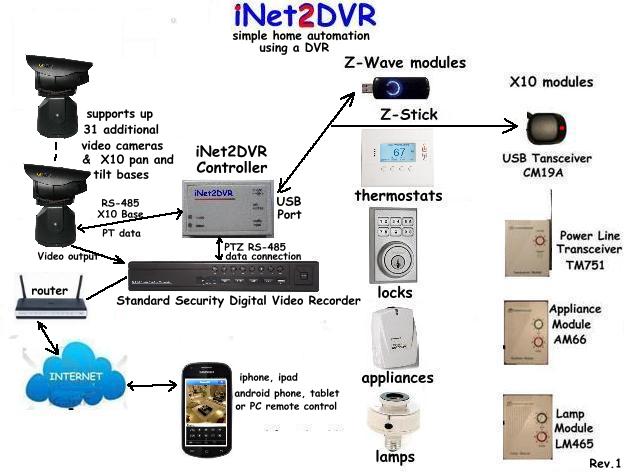
I had a security camera DVR system already installed at my house, the DVR is
always on and connected to my router. I figured that could be my home automation
gateway to the internet. The DVR manufacture provides the app to run their
system for all the major smart phones already. I decided to leverage the
existing Smartphone apps and not have to deal with developing my own apps.
Using the PTZ functions which is provide on all analog security DVR system
provides the control inputs from the Smartphone. The DVR's RS-485 output port
provides the output signals from the Smartphone when the PTZ keys are used. The
visual feedback on the Smartphone I needed would be provided by one of video
input channels of the DVR.
The only connections to the DVR would be to the RS-485 two wire PTZ interface and
one of the composite video input channels. If you have a standard PTZ camera
install on your DVR system with the iNet2DVR it will still work as normal. Most
the PTZ cameras have automatic IRIS setting so the manual IRIS is not used that
much. I chose the +IRIS function for that reason to trigger my OSD generator.
Hardware Design
To implement the system I reused a PIC based microcontroller board I developed
(iNet2X10) that controlled X10 modules thru a wifi IP camera that supports
two-way audio. (The DTMF tones were sent from the PC or Smartphone to the IP
camera's built in web client. The DTMF tones were decoded by the PIC controller
board and sent out thru the X10 USB wireless interface to a X10 receiver that
sends the control signals across the power line.)
The microcontroller board was modified to add the RS-485 interface to the DVR and
reprogrammed to drive the MAX7456 OSD (On-Screen-Display) generator. The output
of the OSD is connected to one of the DVR's video input channels.
The MAX7456 allows the OSD data to be displayed on top of a composite video
signal so you aren't giving up a video camera input channel on the DVR. The OSD
menu just appears on top of the video camera input signal when the iNet2DVR menu
is turned on. The MAX7456 only allows black and white colors and a limited
number graphics characters but it is adequate for my application.
Home Automation Protocol Selection
Two of the home automation protocols were selected based on low cost,
availability, and reliability. The X10 was selected because I had lots of the
modules from years earlier that were laying around. The X10 automation modules
are still available. They can be used for simple non critical on/off operations.
The Z-wave was selected because there are lots of products made by a number of
companies so the prices are competitive. Thermostats, locks and a variety of
appliance, light switches, lamp modules, motion detectors are amongst the many
types of Z-wave enables products that are available. The Z-wave is fairly secure
and uses a wireless mesh network so it is more reliable and more secure than the
X10 h/w.
Additional Enhancements
Additional features were added to enhance the usefulness of the iNet2DVR
system. A video switch which allows up to 16 additional composite video cameras
to be selected to viewed on one of the DVR's video input channel. If you only
have a 4 channel DVR the video switch output is connected one of the DVR's video
input at present the design allows up to 16 additional video cameras can be
added. The Smartphone controls camera to be selected for viewing.
X10 made an inexpensive Pan-Tilt base for their old composite video cameras, it
was called the Ninja pan 'n' tilt base VK74A. It was controlled via a wireless
hand held remote, the range was very limited about 50 ft. I removed the RF board
and replaced it with PIC controller with a RS-485 interface that supports up to
16 addresses. A fixed camera can now be mounted on the PT base and become a low
cost pan and tilt camera controlled from the DVR's Smartphone app using the PTZ
control GUI.
Any questions or comments please contact Conrad Lee -
radleez@yahoo.com